VERSUS MODE · ROUND 1
macOS Spotlight vs Shlexball
Spotlight finds files that contain the words you typed. Shlexball runs an AI model on your Mac, works out what you meant, and finds the files that are about it. Here is the same search in both.
24 September 2026 · 6 minute read
The short answer
Keep Spotlight for opening apps, doing sums and jumping to a file whose name you remember. Use Shlexball when you remember what a document was about but not what you called it. Spotlight is a keyword index. Shlexball is a language model that plans the search, and it runs entirely on your Mac.
One search, two tools
We typed q4 priorities into both, on the same Mac, over the same files.
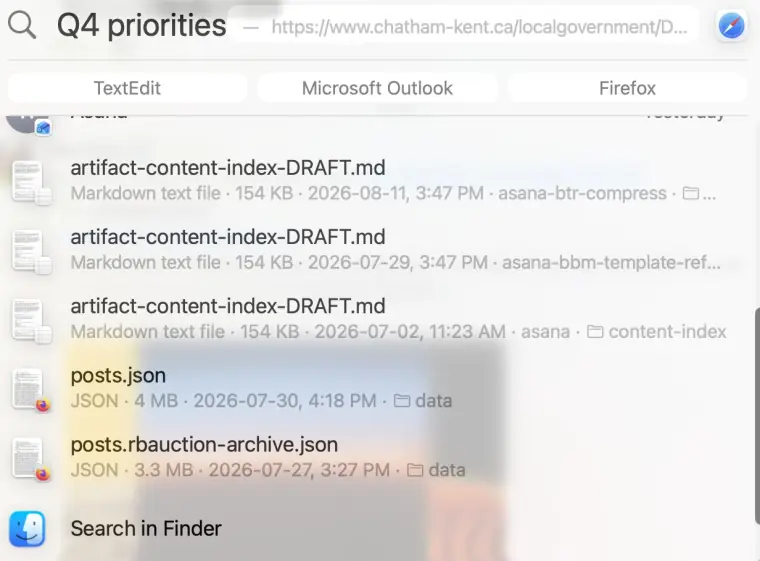
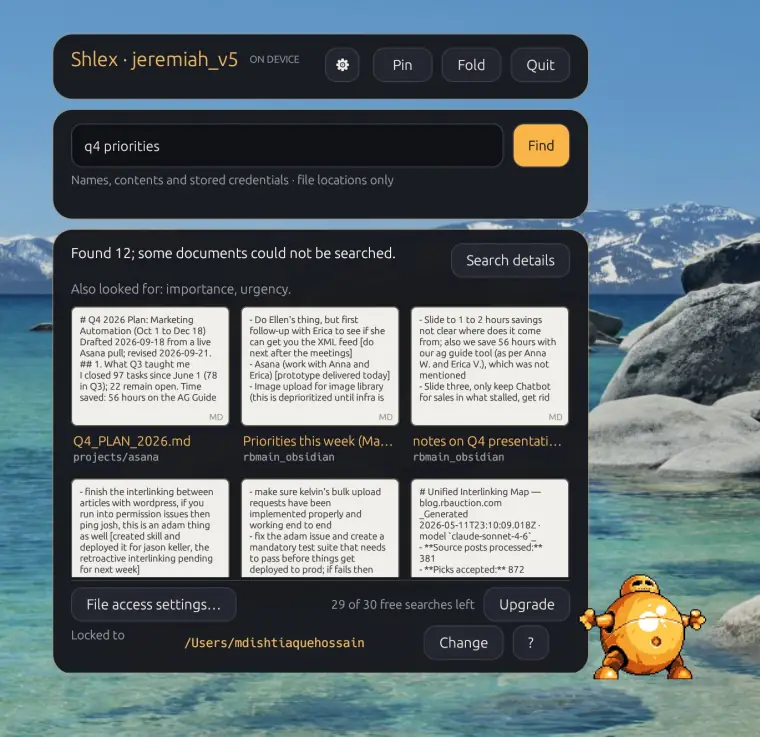
Q4_PLAN_2026.md, a note called “Priorities this week” and “notes on Q4 presentation”. Each card shows the passage that matched. The line above them says the model also looked for importance and urgency, words that mean priority without spelling it.Same words in, very different answers out. Spotlight ranked files by how the letters matched. Shlexball ranked them by what they are.
Why keyword search fails here
Spotlight’s index is a list of words and the files that contain them. That is fast and precise when you know the words. It breaks in three common situations:
- You remember the meaning, not the wording. Your note says “what to tackle first this quarter”. You search “priorities”. The index has no entry that links the two.
- The words appear everywhere. A big export, a log or a search index mentions every topic you have. Keyword ranking rewards those files for sheer volume.
- The request has a shape. “The lease PDF from last spring” is a file type, a topic and a date range. A keyword box treats it as five words to match.
What a local AI adds
Shlexball puts a language model between what you type and the search. The model reads the request the way a person would, then does four things a keyword index cannot:
- Expands by meaning. “Priorities” also brings in importance and urgency.
- Reads the structure. Dates, file types and folder names become filters, not search terms. “The lease PDF from last spring” becomes a file type, a topic and a time window.
- Ranks by fit. A file named
Q4_PLAN_2026.mdabout Q4 plans beats a 4 MB export that happens to mention Q4 once. - Shows its work. Every result card previews the passage that matched, and Search details shows the exact read-only command Shlexball ran.
Why local matters
Cloud AI search would need your files, or at least your file contents, on someone else’s server. Shlexball does not. The model is downloaded once, then runs on your Mac’s Apple silicon. Searching your documents never requires sending them anywhere.
- Private. Your documents are read on your Mac and stay there. Sharing prompts to help improve Shlexball is off until you choose it.
- Offline. After setup, searches run without an internet connection.
- Read-only. Shlexball never changes, moves or deletes a file. Blocked commands never run, and it only searches the one folder you choose.
Side by side
| Spotlight | Shlexball | |
|---|---|---|
| How it matches | Words and names in an index | Meaning, via a local language model |
| “q4 priorities” | A web page, a content index, JSON exports | The Q4 plan, a priorities note, Q4 presentation notes |
| Related words | No | Yes: shows what else it looked for |
| Dates and file types in plain English | Partly, with its own query syntax | Yes, from how you phrase the request |
| Previews the matching passage | No: a whole-file preview | Yes, on every card |
| Searches inside | Anything with a Spotlight importer | PDFs, Markdown and text, Word, PowerPoint, Excel, CSV |
| Where it looks | The whole Mac, plus apps and the web | One folder you choose |
| Speed | Instant as you type | A few seconds per search |
| Where it runs | On your Mac | On your Mac |
| Needs | Any Mac | macOS 15, Apple silicon, 16 GB memory |
| Price | Built in | 30 free searches, then $9 a month or $59 a year |
Where Spotlight still wins
Spotlight is built in, instant and everywhere. It launches apps, converts units, searches Mail and Messages, and finds any file by name in a keystroke. Shlexball does none of those things and does not try to. If you know the file is called invoice-0413.pdf, Spotlight will beat Shlexball every time. Shlexball also needs a recent Apple silicon Mac and a one-time 3.1 GB model download.
Most people only know one tool
In the United States over the past three months, “Spotlight” drew four times the Google search interest of Finder (the Spotlight figure counts every use of the word, so treat it as a ceiling). Dedicated alternatives such as Alfred, EasyFind and mdfind barely registered.
Source: Google Trends, average interest, United States, past 3 months, retrieved 24 September 2026.
Every one of those tools, Alfred and EasyFind included, is a faster way to type keywords. Shlexball is the one that understands the request. We compare each of them in the rounds that follow: Finder, Alfred, EasyFind and mdfind.
Try the same search
Pick a document you can describe but cannot name. Type the description into Spotlight, then into Shlexball. The first 30 searches are free and need no account.
▶ DOWNLOAD SHLEXBALLmacOS 15 or later. Apple silicon. 16 GB memory.