VERSUS MODE · ROUND 2
Finder search vs Shlexball
Finder’s search box looks different from Spotlight, but it asks the same index the same question: which files contain these words? Shlexball asks a different one: which files are about this?
24 September 2026 · 5 minute read
The short answer
Finder is where you browse, sort, rename and move files, and its search is good when you can describe a file by its attributes: a kind, a date, a word in the name. Use Shlexball when you can only describe what a document was about. Finder builds the search from filters you pick. Shlexball builds it from the sentence you type.
How Finder search works
Press Command-F in a Finder window. You choose where to look (This Mac or the current folder), whether the words should match the name or the contents, and then add rows of criteria: Kind is PDF, Last opened date is within the last month, and so on. Save the result as a Smart Folder and it stays up to date.
All of it runs on the Spotlight index, and it shows. We typed q4 priorities into both. First, Finder searching This Mac:
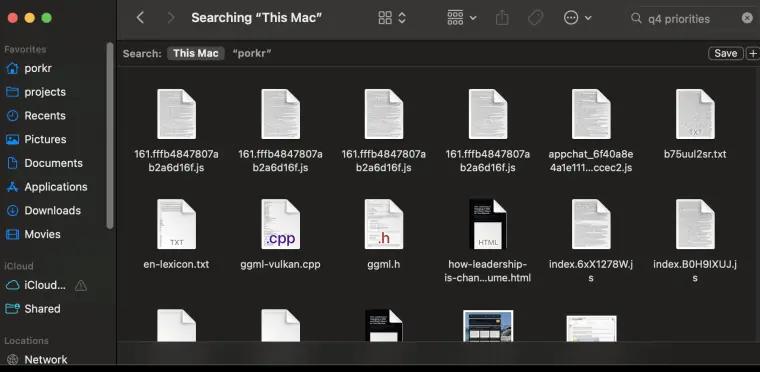
This is what a words-to-files index returns when the words are common: whatever is biggest and most repeated. Big bundles of code mention everything. Finder cannot tell a priorities list from a file that happens to contain the letters.
Filters are keyword search with extra steps
Take a request people make every day: the lease PDF from last spring. In Finder that becomes three rows you build by hand:
- Kind is PDF.
- Created date is between two dates you pick from a calendar.
- Contents contains “lease”.
That works if the document says “lease”. If it says “tenancy agreement” or “rental contract”, the third row throws it away and Finder shows nothing. You then guess another word and try again.
In Shlexball you type the request as you would say it. The local model turns “PDF” and “last spring” into filters and treats “lease” as a topic, so a file about renting a flat still counts.
The same search in Shlexball
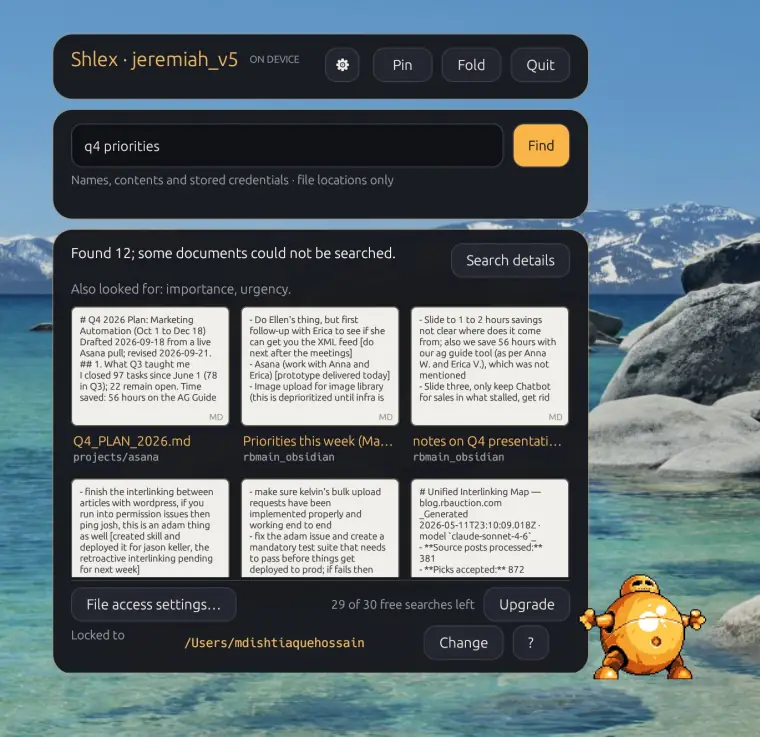
Q4_PLAN_2026.md, a note called “Priorities this week” and “notes on Q4 presentation”. Each card shows the passage that matched. The line above them says the model also looked for importance and urgency.Shlexball read q4 priorities as a request for planning documents about the fourth quarter, searched for words with the same meaning, and ranked a plan above a code bundle that mentions Q4 once. Finder ranked files by the letters. Shlexball ranked them by what they are.
Why local matters
Shlexball’s model is downloaded once and runs on your Mac’s Apple silicon. Your documents are read on your Mac and stay there, searches work offline after setup, and Shlexball only reads: it never changes, moves or deletes a file.
Side by side
| Finder search | Shlexball | |
|---|---|---|
| How it matches | Words in the Spotlight index, plus attribute filters | Meaning, via a local language model |
| Dates and file types | Filter rows you build by hand | From how you phrase the request |
| Related words | No | Yes: shows what else it looked for |
| Previews the matching passage | No: Quick Look of the whole file | Yes, on every card |
| Saved searches | Yes: Smart Folders | Local search history |
| Where it looks | The whole Mac or one folder | One folder you choose |
| “q4 priorities” | JavaScript bundles, a word list, C++ source | The Q4 plan, a priorities note, Q4 presentation notes |
| Moves, renames, deletes | Yes, it is the file manager | Never: read-only |
| Speed | Instant | A few seconds per search |
| Needs | Any Mac | macOS 15, Apple silicon, 16 GB memory |
| Price | Built in | 30 free searches, then $9 a month or $59 a year |
Where Finder still wins
Finder is the file manager; Shlexball is not. Finder moves, copies, tags and deletes. It searches the whole Mac, answers instantly, and Smart Folders keep a saved search current forever. When you know the name, the kind or the date, a Finder filter is the quickest route. Shlexball hands you the file and a Show in Finder button, then gets out of the way.
Try the same search
Pick a document you can describe but cannot name. Look for it with Finder, then ask Shlexball. The first 30 searches are free and need no account.
▶ DOWNLOAD SHLEXBALLmacOS 15 or later. Apple silicon. 16 GB memory.